Spotify is one of the most popular audio streaming services available, with over 180 million subscribers. Many people are content with Spotify’s free version, but others decide how to change payment method on Spotify to access all of its benefits. If you’re a paying subscriber to Spotify, your billing information and preferred payment method are already stored.

The important thing is that you should read the tiny print every time before registering for any subscription model, not only Spotify Premium. You need to know that two of the most crucial factors to consider in changing the payment method on Spotify before beginning a subscription are the duration of your contract and how you plan to pay for it. The key to effectively managing your Spotify subscription is understanding how to switch your payment system. Even though Spotify VIP is very cheap compared to other subscription services, it can still be beneficial to know how to change payment method on spotify.
However, you can alter it if you wish to convert to payment for Spotify with PayPal or if your credit card expires. Whatever the reason, updating your payment details on Spotify is a straightforward process that we’ll walk you through step-by-step.
Table of Contents
How to Change Payment Method on Spotify
I won’t dispute your want to upgrade to Spotify premium once you can create great playlists with more songs. Have you hastily linked your payment card to Spotify and now want to modify it? Allow me to assist you with a short guide to paying for Spotify updates.
Since you cannot alter your Spotify payment option through the Spotify smartphone app or Spotify web player, you only need a reliable internet link and connect directly to a web browser.

How to Modify Your Payment on a PC in Spotify:
The platform is really simple to use, thanks to Spotify. Spotify offers desktop and web browser-based music and podcast listening in addition to its mobile apps.
Although the Spotify pc client for Windows and Mac is valid, you cannot alter the payment method using it. Of course, any browser can be used on a Mac or Windows computer.
To upgrade your payment option on Spotify, make sure you’re online and follow these instructions:
- Open your default browser, then navigate to Spotify web.
- Your email address and password.
- In the upper corner of the screen, select the account profile image.
- Choose “Account.”
- Choose the “Your Plan” submenu by swiping it down.
- Click “Update” in the “Payment” box.
- Select a new payment option.
Spotify will charge your subscription on the following billing date using the recently introduced payment system.
How to Modify Your Payment on an iPhone for Spotify:
On their smartphones, many Spotify viewers choose to listen to music. The Spotify app for the iPhone is simple to use and has many excellent options.
The software does not, however, allow you to change your Spotify payment system. Instead, you’ll need to utilize a mobile browser. Although altering the payment information on a desktop browser may be more convenient, there are instances when you just have your iPhone with you.
To effectively change the Spotify payment option, follow these steps:
- On your iPhone, launch a mobile browser like Safari or Chrome.
- Create an account on Spotify by going there.
- Click on your profile photo, then select See Account.
- Choose “Payment” after “Your Plan” in the menu.
- Entering a new payment option after tapping “Update.”
Remember that providers often impose a short authorization fee when introducing a new payment option to Spotify.
How to Modify Your Spotify Payment on an Android:
The most recent version of Spotify may be downloaded through the Google Play store and is easily accessible on Android mobile devices.
Yet, you can only update the payment option using a phone app and not the Android mobile app.
Thankfully, it doesn’t take long to achieve that; make sure just what to do. Therefore, go to the following instructions to adjust your Spotify payment method:
- Open a web browser on your usable Android smartphone, be it Chrome, Firefox, or another.
- Visit Spotify and sign in with your login information.
- Click “View Account” after selecting your profile photo in the top-right portion of the screen.
- Choose the “Your Plan” submenu by swiping it down.
- Click “Update” after selecting “Payment.”
- Transform the way you pay.
Spotify will charge your monthly cost and store the updated information in the following billing period.
Why are You Unable to Alter my Spotify Payment Method?
Check out the payment options Spotify suggests for your country if you are unable how to change payment methods on Spotify. You should get in touch with Spotify customer care if your payment option is listed. Here is how to adjust your Spotify payment method by contacting customer support:
- Visit Spotify first.
- Tap on About after you scroll down.
- From the Customer Service and Support section, select Contact Us.
- Select the Start Messaging button.
- Select payment methods from the suggested menu, then describe the problem.
For quicker customer service, every app is now creating bots with more frequently asked questions and their answers. The Spotify chatbot below will do its utmost to address your issue. If you select “Help with something else,” Spotify will connect you with a live agent as soon as possible. In two minutes, I received a human response—impressive!
What Methods of Payment are There for Spotify?
Each nation or region may have a different preferred way of payment for Spotify. To find out the payment options that are available in your area, click the link to the Spotify support website. You can adjust your Spotify payment option depending on your country. These are the methods of payment that Spotify service suggests.
- Credit/ debit card
- Prepaid card
- Paypal
- Pay by Mobile
- Gift card
- Pay as you go
If you want to upgrade from Spotify’s free plan to the premium one, use any of these techniques. You can switch Spotify’s pricing options to any of these.
How do I Access my Payment Information on Spotify?
On Spotify’s website, you can always verify your payment information. Try this with the Spotify browser extension. You can access the payment information under Your Subscription by logging into your Spotify profile.
The Best Way to Add a Credit Card to Spotify
Here are all the procedures for connecting a credit card to Spotify payment options in case you want to add it as a payment option.
- Visit Spotify first.
- Open your Spotify account and log in.
- In the upper right side, select the Profile symbol.
- Decide on Account.
- Locate the Your plan part below by scrolling down.
- In the payment area, select Update.
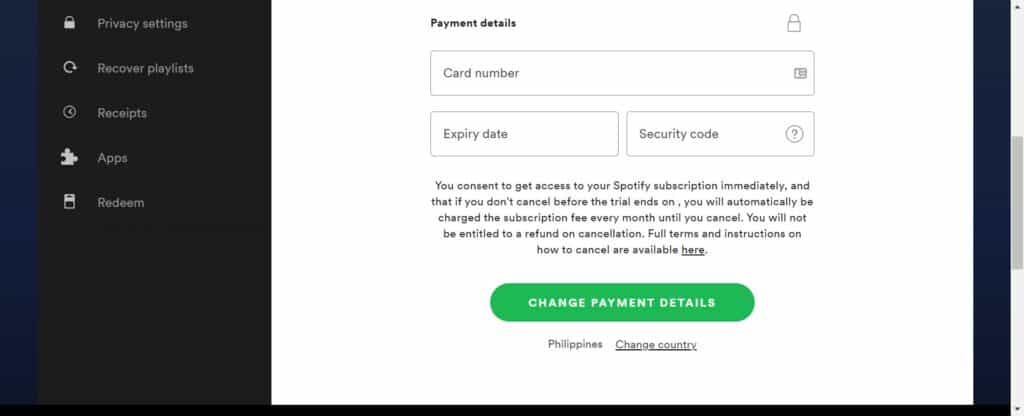
- In the area marked “Change Payment Details,” enter your credit card information.
- Select the option underneath that says “Change Payment Details.”
Your credit card has already been registered as a payment option for Spotify. Update your payment option on Spotify with these simple steps.

Conclusion
You must purchase the VIP plan to make the most of Spotify songs, a clever algorithm that remembers your preferences. However, you are not required to keep using the payment option you provided when you first opened your Spotify account.
You can learn how to change payment method on Spotify in a couple of minutes by following the procedures described. Remember that the Spotify pc or mobile applications cannot be used to make these modifications; only online or mobile browsers may.